
Online Beat Maker ยท Full Browser DAW

Make a beat. Build the whole track.

Spider Studio opens straight into real beat creation: program TR-909 or TR-808 steps, hear the groove, and keep every note in the same Song Part you can edit in Arrangement. No separate toy sequencer. The beat is already part of a complete music-production project.

Start making beats in the browser. No installation needed for Studio.

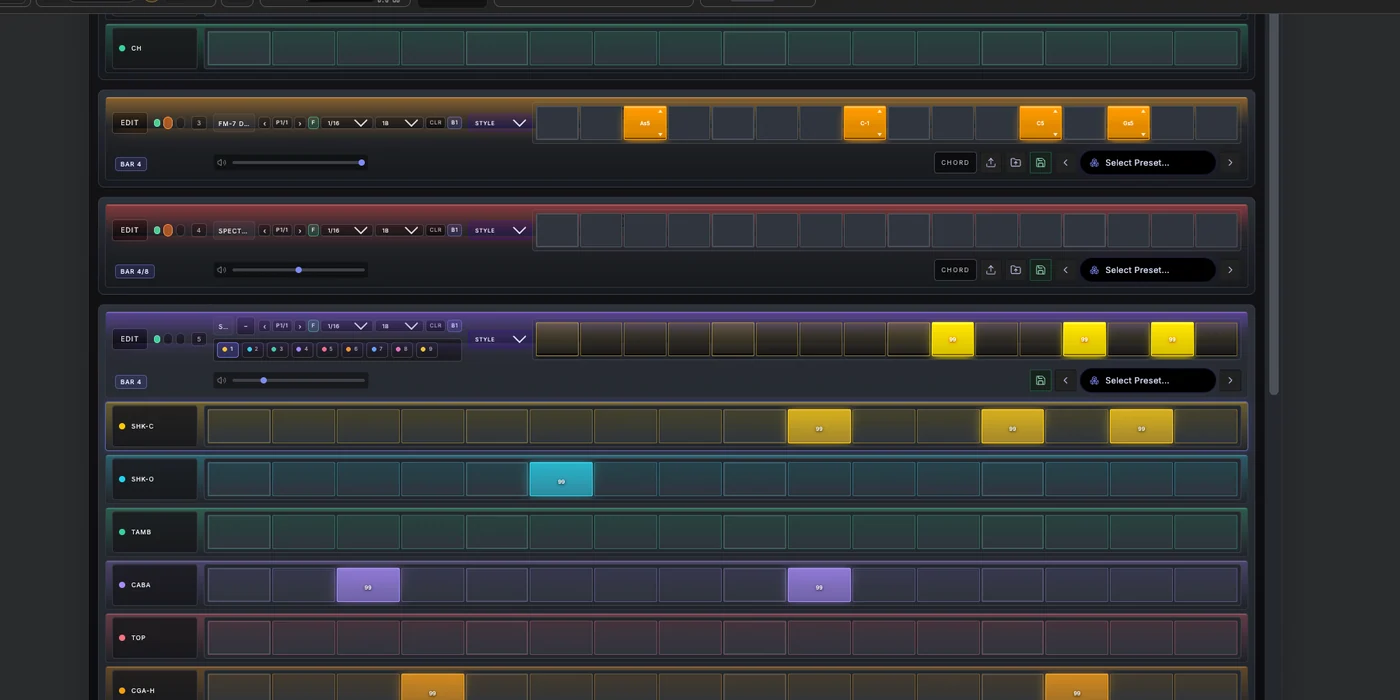
Spider Studio Flow showing multiple drum and melodic step-sequencer tracks inside one Song Part
One project: beat, instruments, Arrangement and mix.

A drum machine that belongs to a DAW

Use the TR-909 for a driving club foundation or the TR-808 for rounder low-end and percussion. Add SPX-727 percussion when the rhythm needs another layer. Studio's steps are editable musical events, not a disposable demo pattern: in Part Locked mode they appear in the active Song Part's MIDI clip in Arrangement.

From the beat to a complete instrument palette

Move from drums to bass, chords, leads and textures without leaving the project. Shape an acid line with TB-303, a mono bass with MOOH, analog-style chords with JULO-60 or Prospect 5, FM tones with FM-7 DinX, and wavetable sounds with Spectral WT. Spider also includes granular and sampler instruments, plus MIDS for external MIDI control. Explore all 13 built-in instruments and MIDI devices.

Play it, route it, finish it

Enter notes from Spider's on-screen controls or a compatible MIDI keyboard; use MIDI output with supported devices and browser permissions. Refine notes and timing in the piano roll, shape tracks in the Mixer and Rack, and work with built-in EQ, compression, delay, reverb, modulation and limiting. On supported desktop systems, the optional Bridge adds native VST3 hosting. The browser DAW remains a complete production path without it.

AI when you want a co-producer

Spider AI can work with scoped patterns, clips, Parts and instrument presets under the applicable plan. You can start the beat manually and keep control of every note; AI is a creative option, not a prerequisite for using Studio.

One production environment

01 / RHYTHM

Immediate beat making

Sequence 808, 909 and percussion parts while you hear the current section.

02 / SOUND

13 built-in devices

Build the bass, harmony, lead and texture with synths, drums and samplers; connect external MIDI gear with MIDS.

03 / SONG

Keep going

Open the same MIDI in Arrangement, then edit, mix, automate and export from the project.

How to make your first beat in Spider Studio

1. Click a rhythm into the drum sequencer

Start in Studio Flow with the TR-808 or TR-909. Add steps, press Play and adjust the groove. The drum machines and the sequencer are part of the DAW, not an isolated beat-making demo.

2. Turn a few steps into a melody

Choose an instrument and a project scale. Click steps to build a rhythm, move them up or down to change pitch, and drag their lengths to shape the phrase. You can also play with the virtual keyboard or a connected MIDI keyboard.

3. Make the loop into a track

Open Arrangement to develop Song Parts, edit clips and shape transitions. Use Spider AI to refine a MIDI idea, generate a section or design a preset, then mix and export from the same project.

Can I make beats on an iPad or tablet?

Yes. Spider's touch-ready Studio Flow lets you program rhythms and melodies, play instruments and continue into Arrangement on a tablet. Explore the step-sequencer workflow or open Studio Flow now.

Do I need music theory to start?

No. Select a scale and create a phrase by clicking and moving steps. The scale tools help keep your notes in key; chord and scale controls give you more ways to develop the idea.

Do I need to register before trying it?

You can open Studio and explore before creating an account. Registration is required for Pro features, and AI access depends on your beta entitlement. Your first beat starts in the actual Studio view.

Make a beat now